Tips Pintar Memilih Harddisk External (Portabel)
 Jika Anda seperti kebanyakan orang, Anda pasti pernah mengalami hal yang satu ini. Merasakan kapasitas simpan pada harddisk yang dipasang di dalam komputer menciut dengan cepat. Maksudnya, dengan cepat Anda kekurangan kapasitas simpan.
Ini sebenarnya tidak mengherankan, mengingat file-file video dari YouTube, koleksi foto hasil jepretan kamera digital yang kian tinggi resolusinya, plus aplikasi-aplikasi menarik yang sering Anda unduh, sunting, dan pakai, terus saja bertambah, sementara kapasitas harddisk tidak Anda tambah.
Kalau sudah begini, solusi yang paling praktis adalah dengan menambahkan sebuah harddisk portabel, alias eksternal. Mengapa kami sebut praktis? Sebab tidak perlu repot-repot buka casing dan menghubungkan kabel harddisk ke motherboard.
Praktis, Ringkas
Tinggal koneksikan saja harddisk portabel ke port USB/FireWire komputer via kabel yang disediakan, dan Anda sudah mendapat tambahan kapasitas, yang mungkin saja lebih besar dibandingkan harddisk yang bercokol dalam komputer Anda. Juga tidak perlu pasang power supply tambahan. Mudah dan cepat bukan?
Harddisk portabel, sesuai namanya, tentu mudah dibawa-bawa, termasuk dimasukkan dalam saku celana, karena bentuknya yang ringkas, kompak. Biasanya, harddisk portabel datang disertai dengan software backup. Memang fungsi harddisk portabel – tadinya – adalah sebagai media backup. Karena itu, harddisk portabel juga berfungsi sebagai pemulih (restorer) data dan file jika file ‘asli’ terkorupsi, karena virus misalnya.
Apa yang Perlu Diperhatikan?
Di pasar saat ini ada banyak sekali pilihan merek harddisk portabel, antara lain A-Data, Buffalo, Iomega, Imation, LaCie, Maxtor, Qnap, Samsung, Seagate, Toshiba, Transcend, dan Western Digital. Fisik harddisk portabel masa kini cantik, mungil, dengan kapasitas yang kian besar. Ada yang mengemaskan harddisk 1,8”, ada yang 2,5”, juga 3,5”. Tinggal pilih mana yang dibutuhkan.
Nah, agar Anda tidak terlalu repot memikirkan apa saja yang harus dipertimbangkan saat membeli harddisk portabel, berikut kami berikan sedikit panduan. Perhatikan hal-hal di bawah ini saat berbelanja harddisk portabel.
1. Kapasitas (kapasitas simpan file maksimal)
Kapasitas simpan harddisk portabel bervariasi, dimulai dari 40GB sampai 500GB. Namun kini juga sudah muncul harddisk portabel yang daya tampungnya mencapai 1,5TB (terabyte). Jika Anda banyak bekerja dengan file video dan grafis, kami sarankan untuk memilih harddisk portabel dengan kapasitas terbesar yang bisa Anda beli.
Selain ditujukan sebagai suplemen harddisk di komputer desktop, kebanyakan harddisk portabel kini justru membidik pasar pengguna notebook dan netbook (mini notebook). Harddisk portabel yang ditujukan pada notebook/mini notebook hadir dalam dua ukuran: 2,5” dan 1,8”. Namun Anda juga tidak dilarang memilih yang berukuran 3,5”, kendati yang satu ini lazimnya ditujukan pada PC desktop. Tentu kenyamanan membawa-bawanya akan berbeda. Selain itu, harga harddisk portabel 1,8” pasti lebih mahal dibandingkan yang 2,5”, kendati keduanya berkapasitas tepat sama.
2. Kecepatan putar drive
Kecepatan putar disk sebagian ditentukan oleh kecepatan laju data, dan dinyatakan dalam rpm (rotation per minute). Umumnya harddisk portabel berputar pada kecepatan 5400rpm.
3. Besar buffer atau cache
Besarnya buffer mewakili jumlah memori yang di-cache, atau disimpan yang bisa ditangani oleh sebuah drive ketika menanti permintaan (request) berikutnya dari sistem. Besarnya buffer berkisar dari 2MB – 16MB. Semakin besar ukuran buffer, semakin banyak data yang bisa disimpan dan semakin cepat pengantaran datanya. Namun semakin besar ukuran buffer yang dikemaskan sebuah harddisk portabel, akan semakin mahal pula harga harddisk portabel tersebut.
4. Fitur Recovery
Pilihlah harddisk portabel yang dilengkapi dengan fitur backup and recovery. Fitur ini berguna di saat file-file Anda mengalami kerusakan atau korupsi data akibat hilangnya asupan listrik secara tiba-tiba, atau pun akibat serangan virus. Melalui fitur recovery, Anda akan bisa memulihkan data yang hilang/rusak.
5. Kemampuan PnP (plug and play)
Tancapkan kabelnya dan harddisk portabel langsung bisa dipakai tanpa perlu instalasi driver atau software apa pun, begitu maksud PnP. Kemampuan PnP khususnya diperlukan jika Anda bermaksud menggunakan satu harddisk portabel di beberapa komputer – PC di kantor, netbook di luar kantor, atau notebook di rumah. (kompas)
Kingston Luncurkan DataTraveler 5000

JAKARTA – Kingston Digital meluncurankan USB Flash Drive DataTraveler 5000. Produk ini adalah FIPS 140-2 Level 2 disertifikasi dengan Level 3, dan berfiturkan enkripsi berbasis hardware 256-bit AES.
Unit ini menggunakan mode sandi XTS dan juga menggunakan elliptic curve cryptography (ECC) algoritma untuk digunakan dalam standard teruji Suite B oleh pemerintahan Amerika.
“DataTraveler 5000 memberikan perlindungan keamanan tingkat tinggi dan enkripsi untuk pemerintahan dan pengguna enterprise,” ujar Nathan Su, Direktur Sales Flash Memori Kingston, wilayah APAC, seperti yang dilansir melalui keterangan resminya, Jumat (29/1/2010).
“Solusi data portable ini mewakili proteksi data dengan nilai seni tinggi yang juga memberikan kenyamanan bagi penggunanya karena mempunyai sistem plug and playm,” tambahnya.
DataTraveler 5000 dilengkapi keamanan terdaftar dari teknologi SPYRUS yang mendukung basis hardware 256-bit AES-XTS dan Suite B cryptography, termasuk ECC. Algoritma Suite B dipilih secara khusus dan terbukti oleh pemerintah Amerika dan Departemen Pertahanan untuk digunakan dalam pembagian data dalam lingkungan multi nasional termasuk kedua aplikasi klasifikasi dan tidak klasifikasi. Mode XTS-AES adalah mode sandi untuk enkripsi yang jauh lebih kuat daripada CBC, ECB dan mode lainnya.
Sertifikasi FIPS 140-2 membutuhkan proses validasi yang memenuhi paket kriteria pemerintahan dari National Institute of Standards and Technology (NIST). Ini sangat penting karena agensi pemerintahan di Amerika Serikat memiliki banyak data yang sensitif yang harus di enkripsi dengan standard FIPS 140-2.
Level 2 memiliki arti bahwa DataTraveler 5000 memiliki konstruksi merusakkan yang jelas yang berfungsi untuk memberikan peringatan kepada semua penggunanya jika drive yang mereka gunakan telah dirusak.
Ini juga merupakan suatu power-on self test yang melakukan verifikasi mekanisme enkripsi berjalan dengan baik ketika drive dicolokkan pada sebuah port USB. Drive tersebut diharapkan menerima sertifikasi FIPS 140-2 Level 3 secepatnya.
DataTraveler 5000 tersedia dalam kapasitas 2-, 4-, 8- dan 16GB. Ini juga tersedia dengan aplikasi onboard Malware scanning via program extensive customization Kingston.
A-DATA SH93 Rugged Portable Hard Drive
Depending on what your profession or hobby is you may only need to backup a small amount of data, or quite the opposite, and have huge storage requirements. The first group can easily get away with using flash memory drives these days. However, if you are looking at storing hundreds of gigabytes of data then an alternate solution will be required.
 One of the most typical and convenient options is having an external hard drive. Not only are these affordable and easy to use, but once data has been backed up, you can take it with you or store it at a safe location. You could go with a 3.5″ form factor drive for the lowest possible price, though when portability is preferred, 2.5″ drives are the way to go.
These are considerably smaller, lighter and do not require an external power source — making them more practical. They are not much more expensive than 3.5″ drives, either. For instance, you can buy a 2.5″ portable hard drive with a 500GB of storage capacity for as little as $90, whereas the cheapest we have come across for a similar capacity 3.5″ model is $70.
Reliability and durability should also be taken into account. Portable hard drives are just an accidental drop away from irrecoverable loss, so spending a bit more to ensure data safety is a no-brainer for someone as ham-fisted as myself. Depending on the use you intend to give this drive you might want to consider that as well.
 We have seen flash-based thumb drives from the likes of OCZ and Corsair survive large drops, being submerged or even frozen if the occasion presents itself. However, creating a portable hard drive this robust presents a few more challenges, as it will not only be heavier but also more fragile because of its internal moving parts.
A-DATA has taken it upon themselves to deliver such a product with their new SH93 line, bringing the industry’s first waterproof and shock resistant portable hard drive. The SH93 was designed for road warriors who need to take their storage with them on the harshest of environments. Let’s take a closer look…
The A-DATA SH93 is only slightly more expensive than your typical portable 2.5″ drive, priced at around $110 for the 500GB version. Other than that, there’s not much typical about this drive. It is designed to be rugged and durable, with A-DATA aiming at students, people constantly on the move and “sports enthusiasts.”Besides the model we tested today the SH93 also comes in 320GB and 640GB capacities, priced at around $80 and $150 respectively, and your choice between bright yellow and red colors.

 The SH93 incorporates a rubber-plastic mix for its housing which acts as a cushion protection against bumps and falls. It fully meets the “MIL-STD-810F 516.5 procedure IV” military standard for transit drop tests, allowing the drive to endure 1.2 m (4 ft) falls onto a hard surface. If you were to drop the SH93 while carrying it or knock it from a desk, this is about how far the unit would fall, so it’s a fair test to certify the drive with.
 Its casing also acts as a water proof skin protecting the 2.5″ hard drive inside from water damage. A-DATA claims that the SH93 is completely waterproof, according to IEC 529 IPX7 standards, in up to one meter deep for up to 30 minutes, which should give you more than enough time to fish it out of a pond. It is worth mentioning that the drive itself does not float so don’t go dropping it in the deep end.
 We wouldn’t just take A-DATA’s claims without first playing rough with the drive for a few days. Apart from knocking it off the desk around a dozen times, I wanted to see how the SH93 handled rough concrete and gravel. Surprisingly, the rubber took this punishment very well without so much as a scratch. Of course, throwing the SH93 in dusty gravel a few times did make it quite dirty, though its waterproof feature came in handy here.

 To clean the drive we simply ran it under the tap and had it looking like new again. Given that the SH93 is waterproof, we then submerged it into the kitchen sink for half an hour, plugged it back in and found our data was still intact as advertised. Upon closer inspection we found no evidence of any leaks when dismantling the SH93. So long as the USB port lid is closed, you’ll get away with exposing this portable drive to water.
 Other than the rubbery outer shell there is another unusual design aspect of the SH93 that A-DATA hopes will help make this product a little more desirable. Instead of requiring users to separately carry around a USB cable, the SH93 includes a 30cm long USB cable that wraps around the body of the drive.
 This is a great idea, although reattaching the cable to the outside of the housing after every use was quite annoying. The cable is not easily tucked away and the whole process is a little clumsy and awkward. That said, we see no obvious solution to the problem so users will just have to be patient when packing up their SH93.
 Rounding out the exterior features is a bright blue LED that signals activity when the drive is in use. As for its internals, the 500GB SH93 model we are testing today uses a 2.5″ Fujitsu MJA2500BH hard disk drive sporting 8MB of cache and spinning at 5400RPM.
| Core i7 Test System Specs – Intel Core i7 965 Extreme Edition (Overclocked @ 3.70GHz) – x3 2GB G.Skill DDR3 PC3-12800 (CAS 9-9-9-24) – Asus P6T Deluxe (Intel X58) – OCZ GameXStream (700 watt) – Seagate 500GB 7200-RPM (Serial ATA300) – HIS Radeon HD 5850 (1GB) Software – Microsoft Windows 7 Ultimate (64-bit) – ATI Catalyst 9.10 |
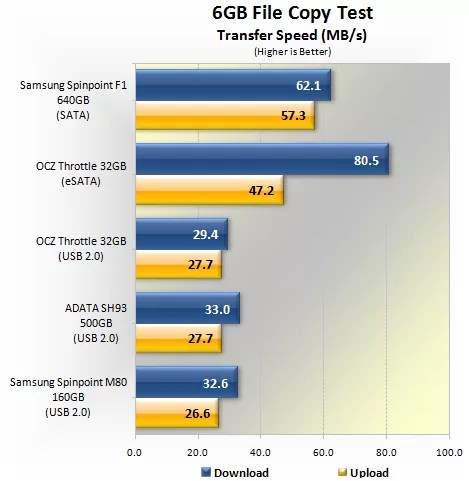 Given that the A-DATA SH93 is limited to the USB 2.0 bus, transfer speeds maxed out at a little over 30MB/s when copying data. With a download speed of 33MB/s and an upload speed of 27.7MB/s, the SH93 performs like a high-speed USB 2.0 device matching the 2.5″ Samsung portable drive and the OCZ Throttle. Of course, the latter had the advantage of being able to use an eSATA interface which greatly improved its performance.
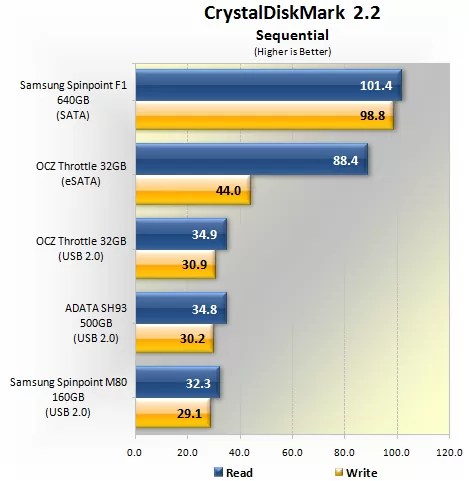
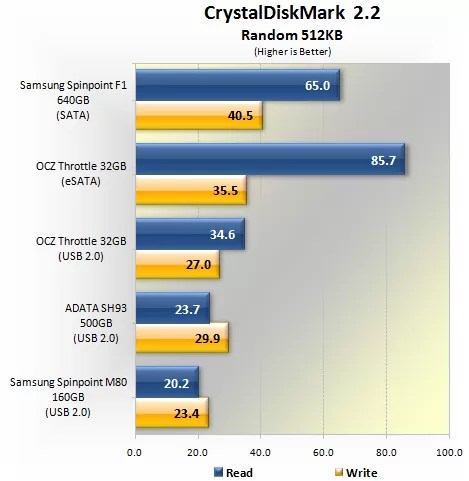 The A-DATA SH93 performed as expected in CrystalDiskMark. Its sequential and random performance was virtually identical to that of the OCZ Throttle and only slightly superior compared to the Samsung Spinpoint M80. When it came to the Random 512KB test, OCZ’s drive came noticeably on top for read speeds among all tested USB 2.0 drives, while A-DATA’s SH93 handled writes a little faster than OCZ and Samsung’s drives.
 There were no surprises in the Random 4KB test, either. The A-DATA SH93 performed as is expected from any hard drive connected to the USB 2.0 bus, while the OCZ Throttle did significantly better in this test due to its use of flash memory.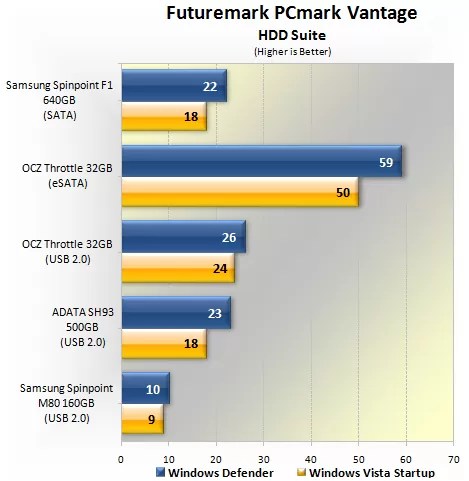
 A-DATA’s portable drive performed considerably better than the Samsung Spinpoint M80 in the first set of PCmark Vantage results. Although it was also slower than the OCZ Throttle in both the Windows Defender and Windows Vista Startup tests, the margins were not nearly as great as those faced by the Spinpoint M80.
Conversely in the second batch of results, which included Gaming and Video Editing tests, we saw the SH93 and Spinpoint M80 deliver very similar results while OCZ’s drive was significantly faster overall.
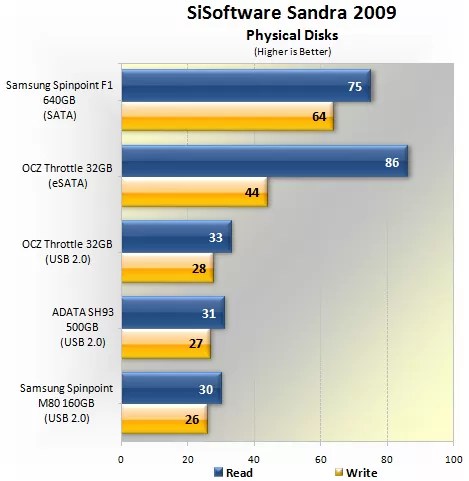 Finally, we ran the A-DATA SH93 through SiSoftware Sandra 2009 using the physical disks benchmark. The results are not all that surprising as all three USB 2.0 devices delivered very similar performance.
Over the years the portable hard drive market has become increasingly competitive and somewhat overcrowded. A quick search at Newegg.com reveals around 50 portable 500GB hard drives based on the 2.5″ form factor, with half of them priced at around $100 or less, and just a handful featuring rugged designs.The A-DATA SH93 is an eye catching product that delivers on all fronts. Its build quality is first-class and the durability it offers far exceeds that of the majority of 2.5″ portable drives, which often feature flimsy plastic bodies that are easily damaged.
The SH93 features a 500GB Fujitsu MJA2500BH hard drive, available online for around $90. This means A-DATA is only charging an extra $20 for their rugged housing — not a bad deal considering a cheap housing will cost you $10 anyway, and going for a quality enclosure separately could set you back significantly more. Two other rugged drives we could find on offer – the LACIE Rugged 500GB and the iomega eGo BlackBelt 500GB – were priced closely to the A-DATA SH93 however.
 In terms of performance, the SH93 was more than capable of topping out the USB 2.0 bus, so anything more substantial than its Fujitsu innards would’ve been a waste. Another could have been the story if the SH93 provided eSATA support for added performance and greater flexibility. With powered eSATA ports becoming a more common sight, this could have given A-DATA’s portable drive the necessary edge against its competitors, though we imagine the more ubiquitous USB connectivity gets them the broadest consumer reach.
Due to the use of thick rubber to protect the enclosure and the drive within, the A-DATA SH93 is bulky compared to your average portable 2.5″ drive. It will still fit in your pocket though, so it’s not deal breaker either.
Although it was added for convenience, we were rather annoyed with the SH93’s wrap-around USB cable. In theory it makes perfect sense to have the cable integrated to the device, but the finished product ended up being a little too clumsy. Removing this cable for use was not a problem, but reattaching it to the enclosure was more often than not a nuisance.
Overall we were impressed with the durability of the SH93, providing a level of toughness unmatched by the majority of portable hard drives. A-DATA has also kept the drive at a very competitive price point of $110 for the 500GB version. If you are seeking for a compact and capacious storage device that can survive knock, bumps and even submersions, then the A-DATA SH93 is the product for you
Prakata
 FRIENDSHIP

ISN'T HOW YOU FORGET, BUT HOW YOU FORGIVE

NOT HOW YOU LISTEN, BUT HOW YOU UNDERSTAND

NOT HOW YOU SEE, BUT HOW YOU FEEL

AND NOT HOW YOU LET GO, BUT HOW YOU HOLD ON
-
-

-
-
-


-

-

My blog is worth $564.54.
How much is your blog worth?
-

-


Recent Comments
 Lintas Berita
- An error has occurred; the feed is probably down. Try again later.
- Info Gue
- An error has occurred; the feed is probably down. Try again later.
- detik.com
- An error has occurred; the feed is probably down. Try again later.
- Tecno
- Kesepakatan AI antara Microsoft-OpenAI dan Google-Samsung Diawasi Uni Eropa, Kenapa?
- Ini Dia Cara Kloning Aplikasi WhatsApp di Berbagai Merek HP
- Link Download Minecraft Terbaru 1.20 Mod APK Unlimited Money Gratis di HP Android
- Marak Serangan Ransomware, Ini Strategi Efektif untuk Lindungi Datanbsp;
- Pemerataan Akses Internet, Biznet Operasikan BNCS-1 sebagai Kabel Bawah Laut Pertama
- PDNS 2 Diretas, Kominfo Targetkan Full Recovery pada Agustus 2024
- 7 Link Situs Download Template PPT Gratis
- Bahas Ransomware PDN, ID-SIRTII: Teknologi Cloud Perusahaan Nasional Sama dengan Asing
- Waspada! Ada Upaya Phising Mengatasnamakan BSSNnbsp;
- Sejak 2023, BSSN Sudah Prediksi Bakal Ada Serangan Ransomwarenbsp;
- Celebrity
- Epy Kusnandar Bantu Istri Jaga Warung Setelah Selesai Rehabilitasi Narkoba
- Tampil Kompak, Andrew Andika dan Tengku Dewi Pakai Baju Couple ke Pengadilan
- Luna Maya dan Darius Sinathrya Jalani Adegan Panas, Syuting Berjalan Profesional
- Intip Kolaborasi Apik DJ Lenn dan Bullo Bersama Jayjax
- Asakata Hadirkan Orkestrasi Dramatis di Single Yang Bergerak
- Lirik Lagu dan Chord Gitar I Think They Call This Love dari Elliot James Reay
- Febby Rastanty: Jangan Buru-Buru Menikah
- Lirik Lagu dan Chord Gitar Tampar dari Juicy Luicy
- Cerai di Depan Mata, Andrew Andika Takut Kehilangan Tengku Dewi Putri
- 9 Selebgram Tersandung Kasus Penistaan Agama dari Hina Yesus hingga Makan Kriuk Babi
- News
- Korban Kebakaran Glodok Plaza Bertambah, Total 13 Kantong Jenazah Dievakuasi ke RS Polri
- Bak Bang Jago, Pria Papua Tenteng Sajam Rusak Mobil Warga di Bandung, Begini Akhirnya
- Putri Gus Dur Bilang Kasus Pagar Laut Dampak Perilaku Koruptif
- Volume Kendaraan Kembali ke Jabotabek Meningkat 37,91% di Periode Libur Panjang Isra Miraj dan Imlek
- Sopir Asyik Lihat Google Maps, Mobil Masuk Parit di Batununggal Bandung
- Libur Panjang Isra Mikraj-Imlek, Volume Kendaraan Masuk ke Jabotabek Meningkat
- Begini Cara Bandit Curanmor Bersenpi Kabur dari Sel Tahanan Polres Muarojambi
- Gempa M4,8 Guncang Tambrauw Papua Barat
- Libur Panjang, 100 Ribu Pengunjung Diprediksi Bakal Padati Ragunan
- Viral Petugas SPBU Dikeroyok Gegara Tegur Pengendara Mobil Merokok di Area Pom Bensin
- International
- 5 Teori Konspirasi Penyebab Kebakaran Los Angeles, Nomor 4 Balasan untuk Genosida Gaza
- Ini Isi Kesepakatan Gencatan Senjata Hamas-Israel yang Akhiri Perang di Gaza
- Hamas dan Israel Sepakati Gencatan Senjata, Akhiri Perang 15 Bulan di Gaza
- Los Angeles Jadi Penyumbang Pajak Terbesar Buat Bantu Israel Genosida Gaza, Benarkah?
- Presiden Korsel Yoon Ditangkap, Ditahan 48 Jam hingga Libatkan Ribuan Petugas
- Kronologi Penangkapan Presiden Korsel Yoon Suk Yeol, 1.000 Penegak Hukum Dikerahkan
- 5 Fakta Penangkapan Presiden Korsel Yoon Suk Yeol
- Kuasa Hukum Presiden Korsel Yoon Klaim Surat Penahanan Tidak Sah!
- Detik-Detik Presiden Korsel Yoon Suk Yeol Ditangkap
- Kebakaran Los Angeles, LAFD Dituduh Tak Becus karena Fokus pada DEI dan LGBTQamp;nbsp;
- Economy
- Kinerja BUMN Karya Diproyeksi Masih Tertekan di 2025
- 370.000 Tiket Kereta Cepat Whoosh Terjual pada Libur Nataru
- Klaim Saldo Dana Kaget Rp400 Ribu Hari Ini Langsung Cairamp;nbsp;
- Tarif Tol Pekanbaru - Kampar Bakal Naik di Awal 2025
- Makan Bergizi Gratis Dimulai Besok 6 Januari 2025, Anggaran 20 Persen dari Dana Desa
- Voucher Token Listrik Diskon 50% Akan Hangus jika Tak Terpakai di Januari 2025?
- DJP Beri Waktu 3 Bulan Bagi Pengusaha Sesuaikan Tarif PPN
- RI Bakal Terapkan Irigasi Padi Hemat Air, Begini Cara Kerjanya
- Daftar Orang Terkaya Indonesia yang Punya Bisnis Sawit
- Harga Emas Antam (ANTM) Hari Ini Stagnan, Berikut Daftar Lengkapnya
-

-

-

-
HINDARI PERGAULAN BEBAS JIKA ANDA TIDAK INGIN DIKATAKAN BINATANG



 Info Berita Rekan